CakeTax
Your Mac locks itself when you walk away.
Pair the iPhone, Apple Watch or Bluetooth tag you already carry. Walk off and the screen locks behind you. CakeTax never stores your macOS password and never types it back in.
The name is an office rule. In a lot of Nordic and European workplaces, leaving your laptop unlocked costs you cake for the whole team.
Request beta access Free for testers · €19 once at launch · macOS 14 or later · Apple silicon and Intel · 4 MB downloadBeta 0.9.0 · Changelog · Made by JIBBY ehf. in Iceland
Made for open-plan offices, coworking desks, café days, and anyone working under a clean-desk or screen-lock policy.
How it works
A one-minute setup with a walk test. Nothing to install on the device — its own Bluetooth identity is the key. iPhone and Apple Watch get the strongest pairing via iCloud; Android phones, watches and tags work when they broadcast a stable identity.
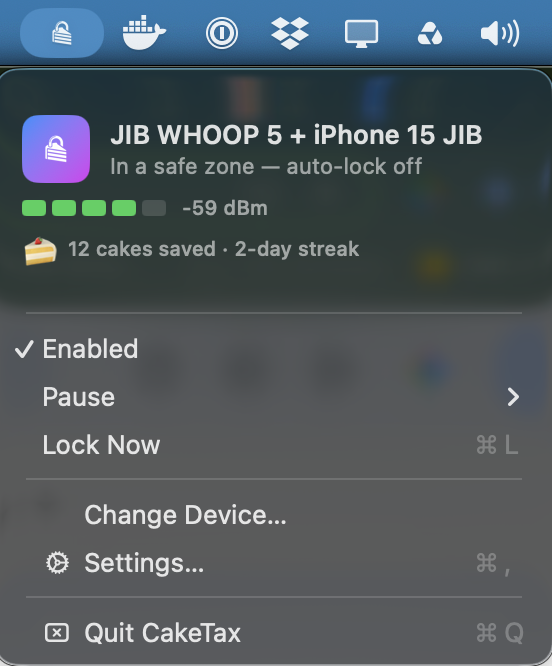
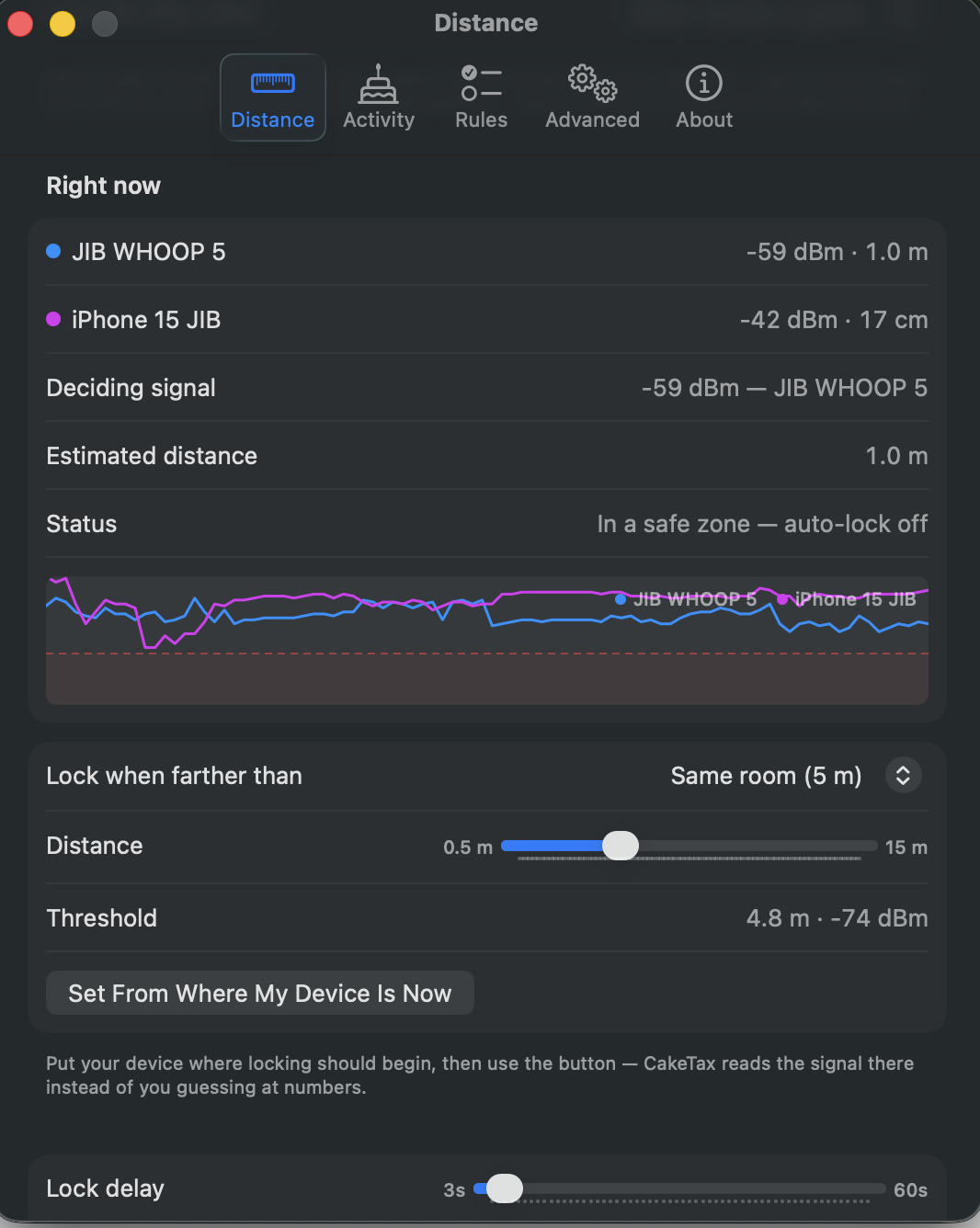
CakeTax watches the Bluetooth signal and locks when you're genuinely gone — tuned in metres, or calibrated by putting the device exactly where locking should begin.
Unlock with Touch ID or your Apple Watch, like always. CakeTax never stores, asks for, or types your password. It locks. That's the whole job, done well.
Why this one
Apps that also unlock your Mac have to keep your macOS password and type it at the login screen for you. CakeTax will not hold it, so there is nothing in it to steal. Touch ID and your Apple Watch already unlock you in a second.
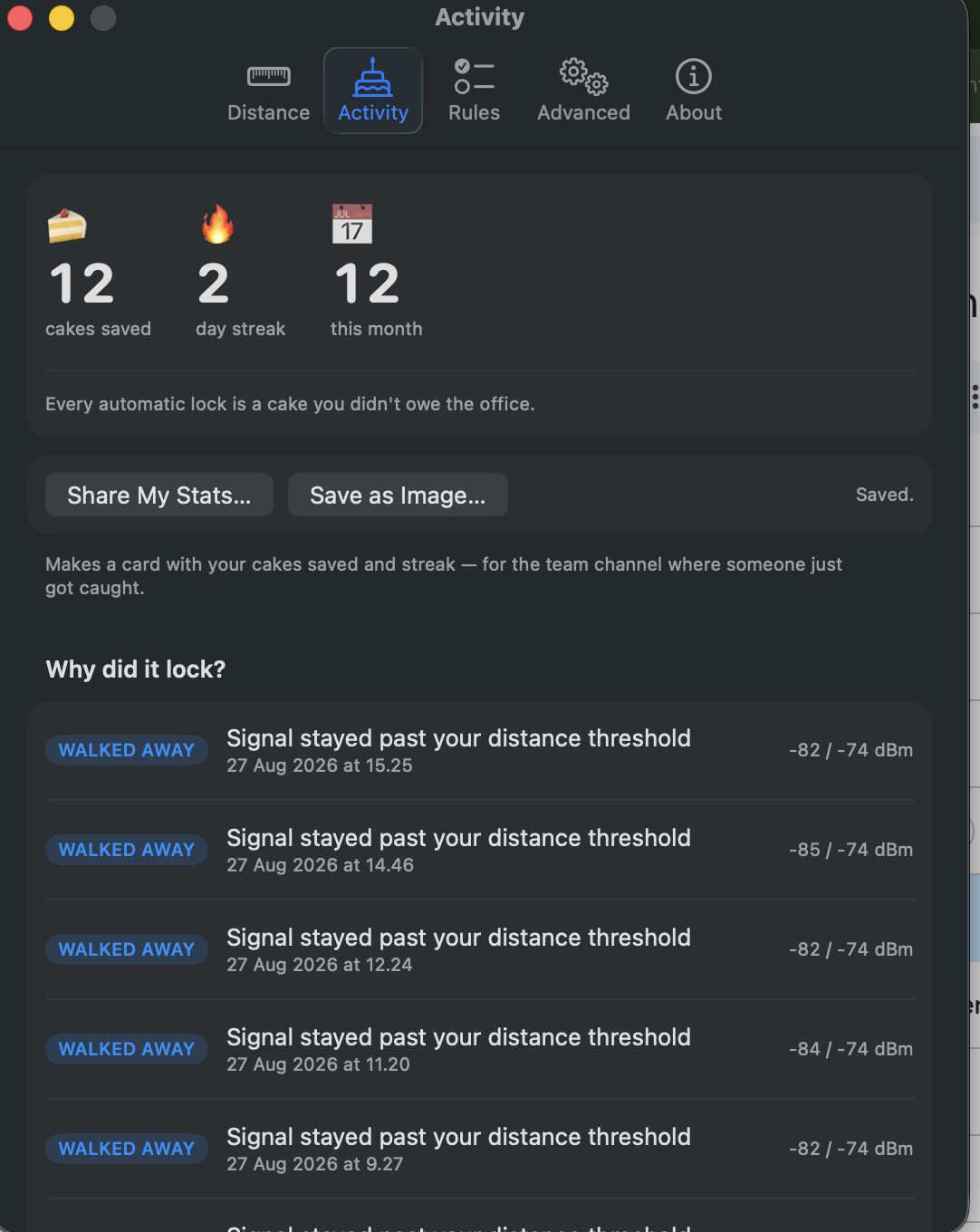
Open Activity and there is a line for each lock: what happened, when, and the signal reading against your threshold. Locks you didn't expect are the usual complaint about apps like this. This is how you check ours.
Keynote, Zoom, a screen share. While any app is keeping the display awake, CakeTax holds fire, so a demo doesn't end at the login screen.
Pair a phone and a watch. Lock when both are gone, lock when either is gone, or let one device decide by itself. A live "Deciding signal" row names the device driving the choice right now.
No account, no cloud, and no statistics until you switch them on. You can read the exact report before you agree to send anything. Everything else stays on your Mac.
Run a Shortcut when it locks and again when you're back. Drive it from
anywhere with caketax://lock, caketax://pause and
caketax://resume. Quiet hours and safe zones are built in.
And it counts your cakes
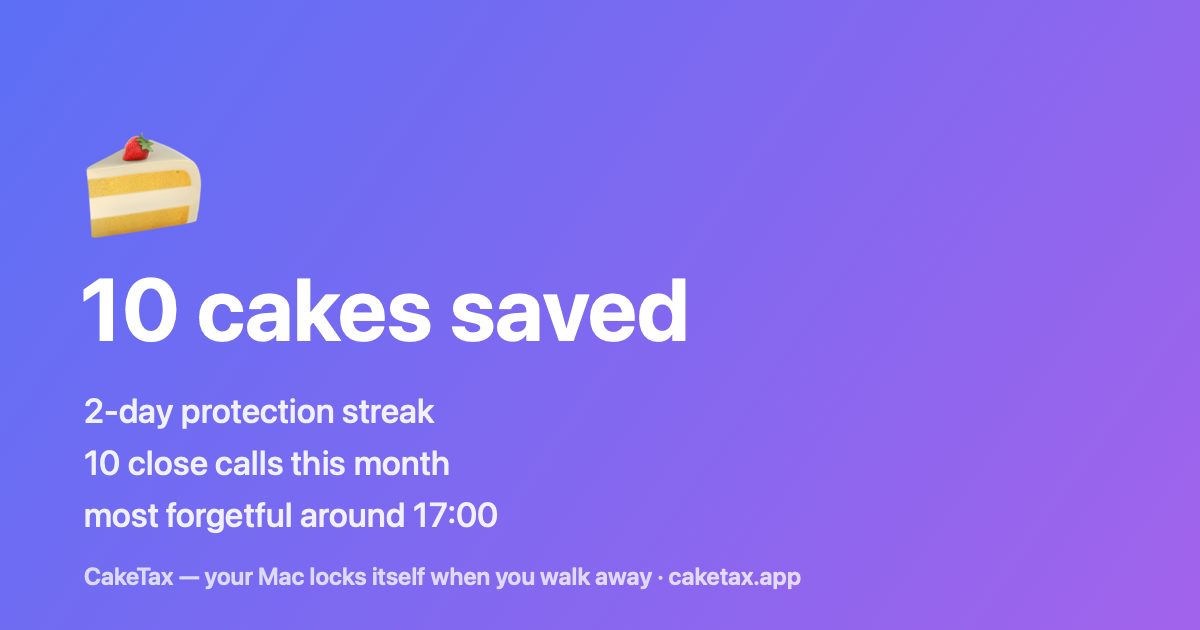
Every automatic lock is a cake you didn't owe. The counter and the streak are there, and you can save a card for the team channel.
Join the closed beta
The beta is free to use. It isn't a free licence to the 1.0 release. Testers get a discount code towards the €19 instead.
- What works: everything above. The beta is the full app.
- What we're testing: lock reliability across desks, cafés and meeting rooms — plus a head-to-head trial of two signal filters running inside the app.
- What we measure: beta builds send us daily research reports — lock and pause counts, your distance and delay settings, and a short signal trace around each lock — tied to your beta code so we can compare the two filters properly. Never your Wi-Fi names, device names, location or event log. This is part of taking part in the beta, and everything is deleted when the beta ends. Full detail in the privacy policy.
- What we ask: if it ever locks while you're sitting right there, open Settings → Activity, check "Why did it lock?", and tell us.
- How it works: tell us what you'd test it with, and we send you a personal download link. Places are limited so every tester gets a real reply — we're keeping the group small enough to actually read everyone's reports.
Pricing at launch
Free for everyone in the closed beta.
- One payment. There is no subscription.
- VAT included for buyers in the EU. $19 in the US.
- 14-day trial, no card up front.
- 30-day money-back guarantee.
- One licence covers every Mac you own.
- All 1.x updates are free. Version 2.0 will be a paid upgrade, at a discount if you already own CakeTax.
- Beta testers get a discount code at launch.
One cake for the team costs more than the licence.
Purchases are handled by Lemon Squeezy as merchant of record. They deal with VAT and invoicing, so checkout works the same wherever you are.
Questions
Basics
How does CakeTax work?
It keeps a Bluetooth Low Energy connection to the device you paired and reads the signal strength every couple of seconds. Signal falls off with distance, so when it stays past your chosen threshold — or the device leaves range — for your chosen delay, the Mac locks.
Which devices work?
iPhone and Apple Watch work best — their iCloud identity gives the strongest pairing, and the hardest to spoof. Android phones, smartwatches, tags and other Bluetooth LE devices work too, provided they broadcast a stable identity; the setup walk test verifies that before anything is trusted.
Can I pair two devices?
Yes — phone and watch, say. Pair the second one in Settings → Distance with the same one-minute walk test, and the settings show each device's own live signal and distance, each drawn as its own line on the signal graph.
How does locking work with two devices?
You pick the rule, in Settings → Distance:
Both devices are gone (the default): the Mac counts as attended while either device is near, so whichever one you happen to carry keeps it unlocked. The nearest device's signal decides.
Either device is gone (strict): the Mac locks as soon as any device moves past your distance — here the farthest device's signal decides. Note what strict means: a device that isn't with you at all counts as gone, so leaving one at home locks the Mac after the out-of-range patience.
Only one device decides: pick which. The other stays visible in the settings and on the graph, but it neither keeps the Mac unlocked nor locks it — handy when the phone lives on the desk all day and only the watch should matter.
Whatever the rule, the settings show a "Deciding signal" row naming the device currently driving the decision, so what you see is what the app is acting on.
Why doesn't my iPhone or Watch show up in the device list?
For Apple devices, your Mac and the iPhone/Watch must be signed in to the same Apple ID — that's what lets the Mac recognise them through Bluetooth's privacy address rotation. Also wake the device and keep it next to the Mac while scanning. If it still hides, toggle Bluetooth off and on, on both devices.
Which macOS versions are supported?
macOS 14 (Sonoma) and later.
Will it drain my phone's battery?
No. Your phone already broadcasts Bluetooth LE for AirDrop and Handoff; CakeTax listens and connects from the Mac side. There is no app running on the phone.
Do I need to keep the app open?
CakeTax lives in the menu bar and works in the background. Turn on "Launch at login" in Settings → Advanced and you never think about it again.
Distance & reliability
Can I adjust the locking distance?
Yes — in metres, not radio jargon. Use the slider, pick a preset (arm's reach, at my desk, same room, left the room), or press "Set From Where My Device Is Now" with the device placed exactly where locking should begin.
What if my signal dips while I'm sitting at my desk?
Several guards catch this. CakeTax never locks while you're typing or moving the mouse; brief dips are smoothed away and forgiven by your lock delay; the app knows when macOS throttled its own readings and never mistakes that silence for you leaving; and every lock is explained afterwards in Settings → Activity → "Why did it lock?".
My device isn't with me — will the Mac keep locking over and over?
No. CakeTax locks once per departure, by construction: after a lock it disarms, and it only re-arms when your device actually comes back within your distance (plus a safety margin). So if you unlock with your password while the device is still elsewhere, the Mac stays unlocked — for minutes or hours — until a device returns and leaves again. There is no loop to fall into. On top of that, a configurable cooldown holds fire right after any unlock, it never locks mid-typing, and for planned "my phone is elsewhere today" days there's Pause in the menu bar and safe zones. This exact scenario is covered by an automated test in the engine.
What are the cooldown and fine-tuning settings?
After you unlock, CakeTax waits a configurable cooldown (up to 180 s) before it can auto-lock again, so an unlock at the edge of range can't flap. Settings → Advanced also exposes the re-arm margin (hysteresis) and out-of-range patience if your environment needs tuning.
How precise is the distance, really?
Bluetooth signal strength is honest physics: dependable at "left the desk" and "left the room", not a tape measure. Walls, bodies and pockets shift it. Tune by feel — the metre figures are a dial, not a measurement.
Why can't it just monitor any nearby Bluetooth device without pairing?
Modern phones randomise their Bluetooth address precisely to stop that kind of tracking. CakeTax pairs with one chosen device whose identity it can verify — which is also what makes the pairing trustworthy.
I can't see the menu bar icon.
On notched MacBooks, macOS silently hides menu bar icons that don't fit. CakeTax detects this and warns you; free space by removing icons you don't need (⌘-drag them off the bar). Auto-locking keeps working even while the icon is hidden.
Security & privacy
Can CakeTax unlock my Mac too?
No, and that's deliberate. Auto-unlock generally requires storing your macOS password and typing it into the login screen for you. We think a security tool shouldn't hold the key to your Mac — and with Touch ID and Apple Watch, unlocking is already instant. CakeTax locks. That's the job.
What if someone just turns Bluetooth off?
Your choice, in Settings → Rules: by default CakeTax pauses (a radio outage isn't you leaving), or flip one switch and the Mac locks the instant Bluetooth goes down — because that's also the first thing a tamperer would try.
Is the app itself trustworthy?
Release builds will be signed with an Apple Developer ID and notarised by Apple. That check confirms the app hasn't been tampered with and screens it for malicious code. Closed-beta builds are handed out before that is in place, so macOS will warn you the first time you open one and testers are told to expect it. Once CakeTax is on sale, a Gatekeeper warning on a CakeTax build means the build isn't ours. Don't bypass it.
Does CakeTax need internet access?
No. It runs fully offline. The only network features are the update check and opt-in anonymous statistics — both described in the privacy policy, and the statistics are off until you switch them on.
Why isn't it on the Mac App Store?
Locking the screen instantly uses a system call the App Store doesn't permit, so CakeTax is sold here instead — signed and notarised through Apple's Developer ID process, like most serious Mac utilities.
Buying
How do I get into the beta?
Fill in the form above. We read every entry and send invited testers a personal download link by email — we're keeping the group small enough that everyone gets a real reply and every report gets read. Tell us what device you'd carry and where you'd use it; that's how we pick for spread rather than first-come-first-served.
What does it cost?
Free for beta testers. At launch it is €19 once, or $19 in the US, with VAT included for buyers in the EU. There is no subscription. You get a 14-day trial without a card and a 30-day money-back guarantee, and beta testers get a discount code.
Will I have to pay again for updates?
Every 1.x update is free. When version 2.0 arrives it will be a paid upgrade, and you'll get a discount for already owning CakeTax. A major version takes months of work, and this is how that gets paid for.
Can I use one licence on several Macs?
Yes — one purchase covers all Macs you personally own and use.
Where do I get help?
Email hello@caketax.app (or beta@caketax.app for beta feedback). Include the "Why did it lock?" entry from Settings → Activity if it's about a lock you didn't expect — that's usually all we need.